Understanding AI Model Parameters: Temperature, Top-P, and More

You've written the perfect prompt. You send it to the API. The result is... okay.
So you tweak the temperature. Maybe you fiddle with top_p. You're not quite sure what they do, but you've heard 0.7 is a "good number."
This is the "Black Box" phase of AI engineering. To move from a tinkerer to an engineer, you need to understand the math behind the magic. These parameters aren't just random knobs; they are precise controls for the probability distribution of your model's output.
Here is the definitive guide to LLM parameters in 2025.
The Probability Game
Before we touch a dial, remember how LLMs work. They don't "think." They predict the next token based on probability.
If I say: "The sky is..."
The model calculates probabilities for every token:
- blue: 65%
- cloudy: 20%
- gray: 10%
- dancing: 0.001%
The parameters you set determine how the model chooses from this list.
Temperature: The "Creativity" Knob
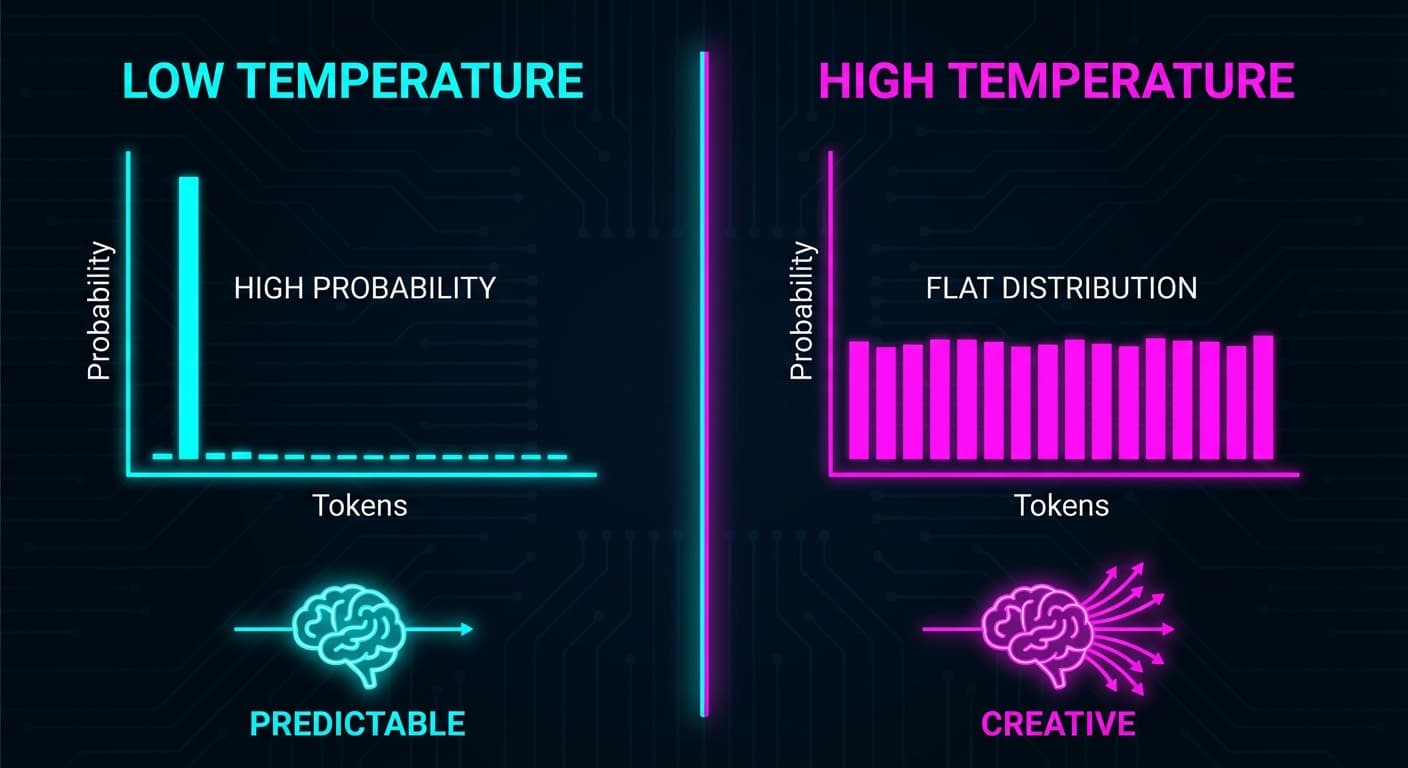
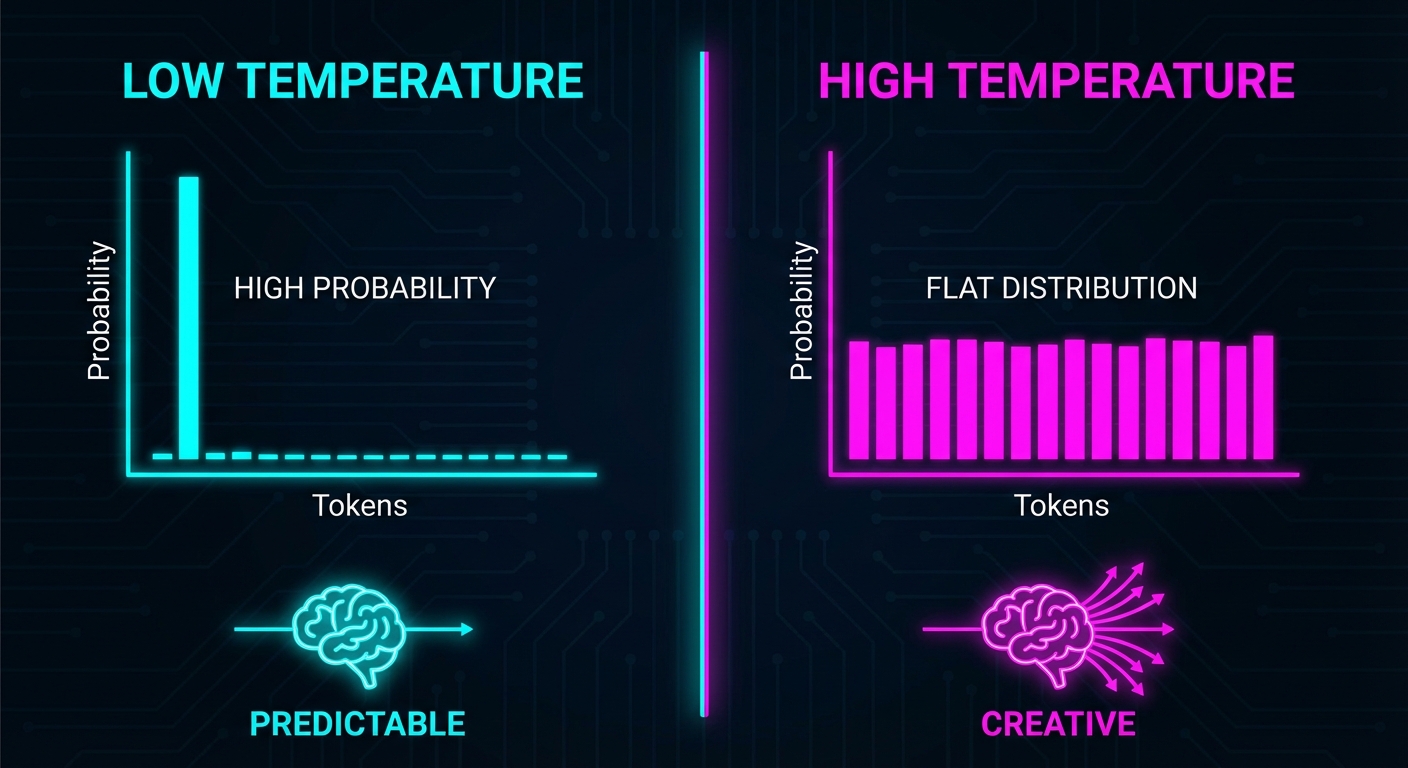
Temperature controls the "shape" of the probability curve.
Low Temperature (0.0 - 0.3)
The model becomes extremely conservative. It exaggerates the difference between the "best" token and the "okay" tokens.
- Use Cases: Coding, Data Extraction, JSON formatting, Factual Q&A.
- Why: You want the right answer, not a creative answer.
const { text } = await generateText({
  model: openai('gpt-4o'),
  prompt: 'Write a function to calculate factorial',
  temperature: 0.2, // Consistent, correct code
});High Temperature (0.8 - 1.5)
The model flattens the curve. Less obvious tokens become more likely.
- Use Cases: Creative writing, Brainstorming, Poetry.
- Warning: Above 1.5, the model produces incoherent text.
Example:
Prompt: "Describe a sunset"
Temperature 0.2: The sun sets below the horizon, casting orange and pink hues across the sky.
Temperature 1.2: The sun melts into the horizon like honey dripping from a cosmic spoon, painting the clouds in shades of tangerine dreams.
Top-P: The "Focus" Filter
Top-P (Nucleus Sampling) changes the options instead of the probabilities.
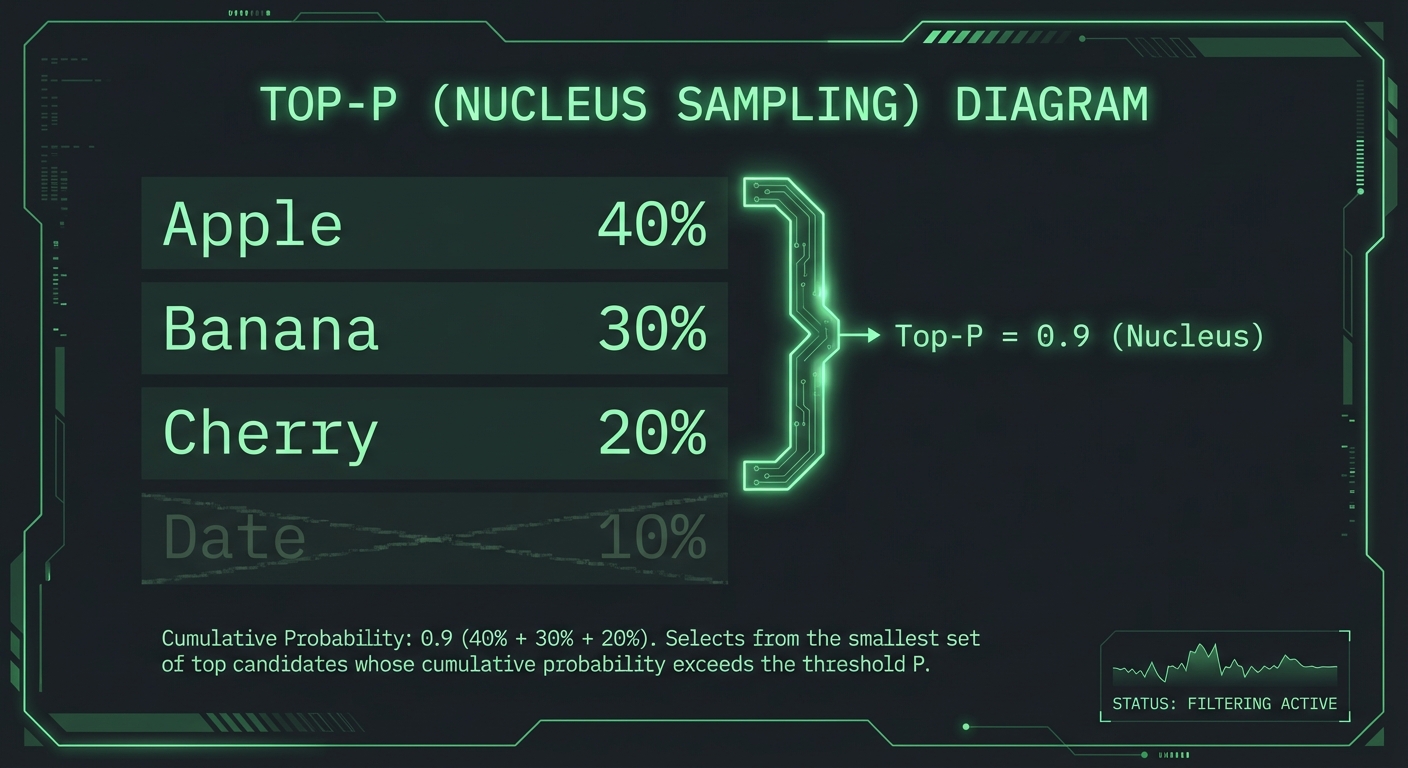
The model ranks all tokens by probability and adds them up until it hits your top_p value (e.g., 0.9).
Example: "The sky is..."
- blue (65%) + cloudy (20%) + gray (10%) = 95%
If top_p is 0.9, the model picks from {blue, cloudy, gray}. "Dancing" is excluded.
When to use:
- Low Top-P (0.1): Only top candidates allowed. Extremely focused.
- High Top-P (0.9-1.0): Most reasonable tokens allowed, but nonsense is cut off.
const { text } = await generateText({
  model: openai('gpt-4o'),
  prompt: 'List 5 creative startup ideas',
  temperature: 0.9,  // High creativity
  top_p: 0.85,       // But exclude truly bizarre options
});The Penalties: Frequency vs. Presence
Both range from -2.0 to 2.0. Positive values discourage repetition.
Frequency Penalty
Penalizes tokens based on how many times they've appeared.
Before (0.0): The new smartphone is great. The new smartphone has amazing features.
After (0.6): The new smartphone is great. It features amazing capabilities.
Use Cases: Blog posts, marketing copy, long-form writing.
Presence Penalty
Penalizes tokens if they've appeared at all.
Before (0.0): The room was dark. The dark hallway led to another dark room.
After (0.8): The chamber was dim. A shadowy corridor opened into a gloomy space.
Use Cases: Brainstorming lists, topic exploration.
const { text } = await generateText({
  model: openai('gpt-4o'),
  prompt: 'Write a product description for wireless headphones',
  temperature: 0.7,
  frequency_penalty: 0.5,  // Reduce word repetition
});The Golden Rule
Start with Temperature. Leave Top-P at 1.0.
Temperature and Top-P both control randomness. Adjusting both makes it hard to predict the outcome.
OpenAI's Recommendation:
- Use temperature for most tuning (0.0 for deterministic, 0.7 for balanced, 1.0+ for creative)
- Leave top_p at 1.0 (default)
When to use both: Advanced use cases like constrained creative writing (temperature: 0.9, top_p: 0.85).
Quick Reference
Code Generation
- Temperature: 0.0 - 0.2
- Top-P: 1.0
- Penalties: 0.0
Chatbot (Friendly)
- Temperature: 0.7
- Top-P: 1.0
- Frequency Penalty: 0.3
Creative Writing
- Temperature: 0.8 - 1.0
- Top-P: 1.0
- Frequency Penalty: 0.5
Fact-Based Q&A
- Temperature: 0.3
- Top-P: 1.0
- Penalties: 0.0
Common Mistakes
Setting Temperature to 2.0 for "Maximum Creativity" You don't get creativity; you get incoherence. Use 0.8-1.2 for creative tasks.
Using Presence Penalty for Code Code requires repeating variable names. Presence penalty breaks this. Leave at 0.0 for code.
Expecting Temperature 0.0 to Be Perfectly Deterministic
Even at temperature 0, models have slight variance. Use a seed parameter for true repeatability (OpenAI API).
Summary
- Temperature changes the odds (probability distribution shape)
- Top-P changes the options (excludes low-probability tokens)
- Frequency Penalty stops repetition (penalizes based on count)
- Presence Penalty forces new topics (penalizes any reuse)
The 80/20 Rule: For 80% of use cases, just adjust temperature. Leave everything else at defaults.
Mastering these dials is the difference between an AI that "sort of works" and one that is reliable, professional, and production-ready.
Happy engineering!

Frank Atukunda
Software Engineer documenting my transition to AI Engineering. Building 10x .dev to share what I learn along the way.
Comments (0)
Join the discussion
Sign in with GitHub to leave a comment and connect with other engineers.